

Evals
Measure and improve AI query quality
Evals let you systematically test how well the AI generates SQL for your data. Think of them as unit tests for your AI assistant.
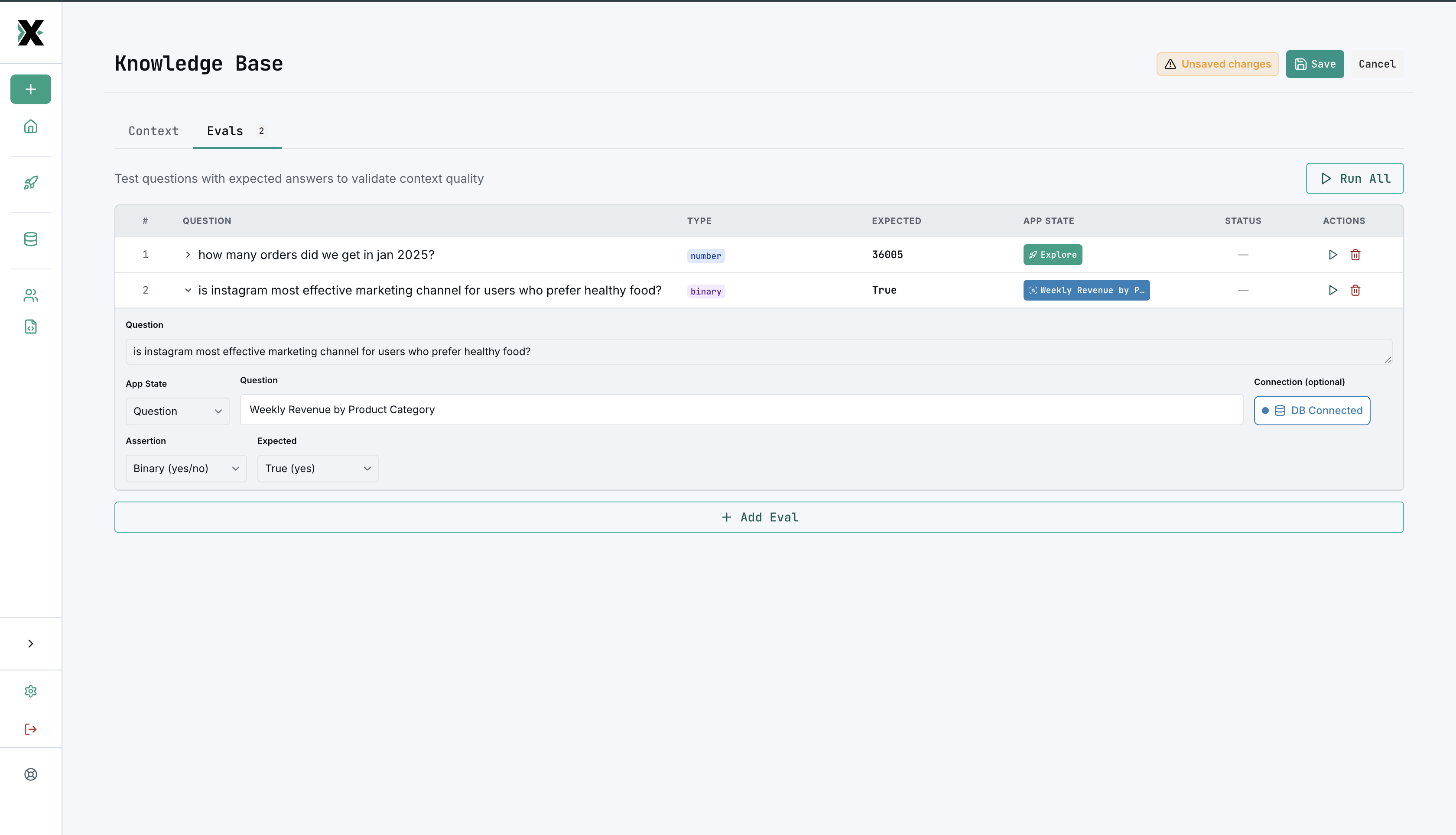
How evals work
An eval is a test that verifies the AI can answer a specific question correctly. Each test has three parts:
- Subject — what to test (an existing saved question, or inline SQL you provide)
- Assertion type — how to check the result
- Expected value — what the correct answer looks like
MinusX runs the subject, evaluates the assertion, and reports pass or fail.
Assertion types
| Type | What it checks | Example |
|---|---|---|
| Binary | Pass/fail — did the query run and return results? | "Can the AI answer: what was last month's revenue?" |
| Number match | Does a numeric result match the expected value? | Expected: 42,350.00 |
| String match | Does a text result match the expected value? | Expected: "US-West" |
Comparison operators
For number and string assertions, you can use these operators:
| Operator | Meaning |
|---|---|
= | Exact match |
~ | Approximate match |
< | Less than |
> | Greater than |
<= | Less than or equal |
>= | Greater than or equal |
Test subjects
Each test can use one of two subject types:
- Saved question — references an existing question by ID. The AI re-generates the query from the question's natural language description.
- Inline SQL — you provide the SQL directly. Useful for testing specific query patterns.
Expected values
The expected value can be:
- Constant — a fixed value you provide (e.g.,
1000,"active") - Query result — the result of another SQL query (useful for dynamic assertions)
- Cannot answer — asserts that the AI correctly identifies it cannot answer the question given the current context
Why use evals?
Evals help you:
- Measure baseline quality — how accurate is the AI with your current context?
- Track improvement — does adding more context make the AI better?
- Catch regressions — did a schema change break previously working queries?
- Identify gaps — which types of questions does the AI struggle with?
Creating evals
- Navigate to the Evals section in the Knowledge Base
- Add tests with subjects, assertion types, and expected values
- Run the eval set to see results
- Use the results to improve your text context and table whitelisting
Best practices
- Start with the most common questions your team asks
- Include edge cases and tricky queries
- Use binary assertions for "can it answer this at all?" and number/string match for precision checks
- Update evals as your data model changes
- Aim for a diverse set that covers different query patterns (aggregations, joins, filters, etc.)
- Use the cannot answer expected value for questions that should be out of scope given your current context